
24 lines
1.2 KiB
Markdown
24 lines
1.2 KiB
Markdown
^^^ This is all you need to add a wireguard config file. ^^^
|
||
|
||
If for some reason you still want to use the GUI
|
||
Here is my original tutorial
|
||
|
||
1. Install `nm-connection-editor` via your package manager.
|
||
|
||
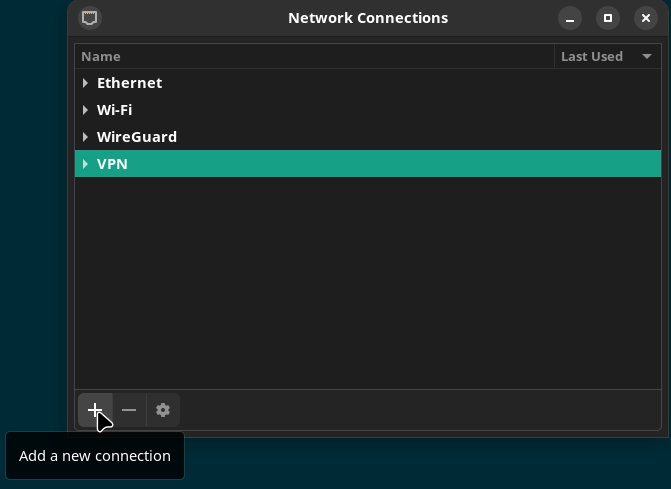
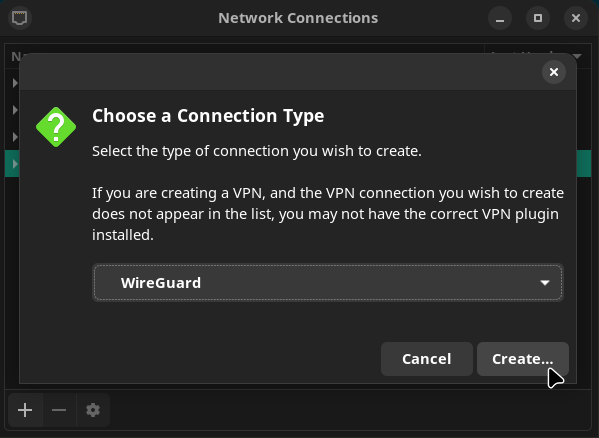
2. Open the Advanced Network Configuration GUI, add a new connection & select WireGuard
|
||
|
||
|
||
|
||
|
||
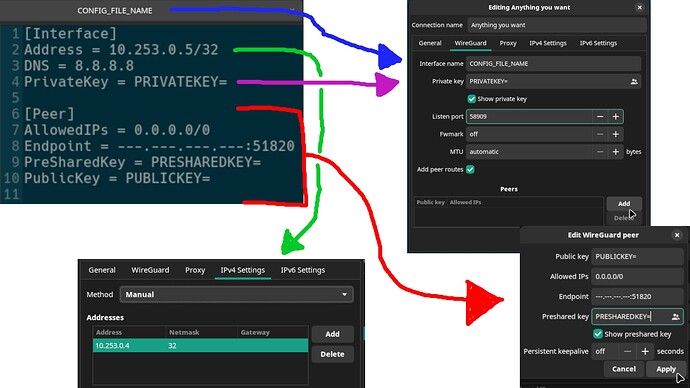
3. Use the following diagram to translate your WireGuard client config file to the Advanced Network Configuration GUI.
|
||
|
||
[
|
||
|
||
HowTo1920×1080 114 KB
|
||
|
||
](https://forum.manjaro.org/uploads/default/original/3X/1/7/177682f37daed1b4e8283f836fd57af349bc4852.jpeg "HowTo")
|
||
|
||
|
||
Enjoy your WireGuard VPN integrated into the OS!
|
||
|
||
Note: the “Listen port” will **not** be in your WireGuard client config. I used 58909 & that worked for me. |